Personas
Evaluate your chatbot end-to-end by letting reusable, simulated users pursue a goal across real, multi-turn conversations.
A Persona is a reusable definition of a simulated user. In a persona experiment, an LLM simulates each persona while pursuing a goal, the bot or LLM endpoint under test responds turn by turn, and the resulting transcript is rated as one unit by your criterion set. Personas live in a project-wide library, are organized into persona groups, and are run against a collection so that every persona is evaluated against every scenario in a single experiment.
What It Is
Define personas once in the library and reuse them across experiments:
- The Persona Library holds your reusable, versioned personas.
- A Persona Group is a named pool of personas you select for an experiment.
- A persona experiment runs every persona in the group against every row of a question library — this fan-out produces one simulated conversation per persona and row. xs
Quick Start
- Open Personas (under Library in the sidebar) and create a new persona with the New button.
- Create a persona group and add the personas you want to evaluate together.
- Create a Persona collection that follows a template and already contains all the required columns.
- Under Criteria Library, create a new criterion set.
- Optional: Go to Prompt Templates and create a system-only template — the system prompt for your bot under test.
- Go to Experiments → New Experiment and pick the Persona type.
- Choose your persona group, the collection, optionally the system-message-only template, an LLM config for the bot, and a criterion set.
- Run the experiment. Every persona is run against every row, and each transcript is rated by the criterion set.
Key Concepts
| Concept | Description |
|---|---|
| Persona | A reusable, versioned simulated user. Has a name, a persona description (the personality and behavior), and optional domain knowledge (background knowledge the simulated user has). The description and domain knowledge may contain {{column}} placeholders filled from the collection row. |
| Persona Library | The project-wide collection of personas. Personas can be shared org-wide (read-only in other projects). |
| Persona Group | A named, mutable pool of personas. Experiments reference a group; its members are pinned into the experiment at launch. |
| Question Library | A Persona-type collection holding one scenario per row. Must contain a Persona goal column that gives the simulator the goal to pursue. Other columns can be referenced as {{placeholders}} in persona descriptions. |
| Simulator | The LLM that plays the user, driven by the persona. The simulator is a deployment-level setting and is not user-configurable. |
| Bot / LLM endpoint under test | The LLM that plays your assistant, defined by the experiment's LLM config plus a system-only prompt template. |
| Termination | The simulator can call an end_conversation tool with one of three reasons — goal_met, goal_failed, or stuck. If it never calls the tool, the loop stops at a hard cap of MAX_TURNS = 16. |
The Persona Library
Open Personas under Library in the sidebar. The page is a two-pane workbench: the Persona Library on the left and Persona Groups on the right.
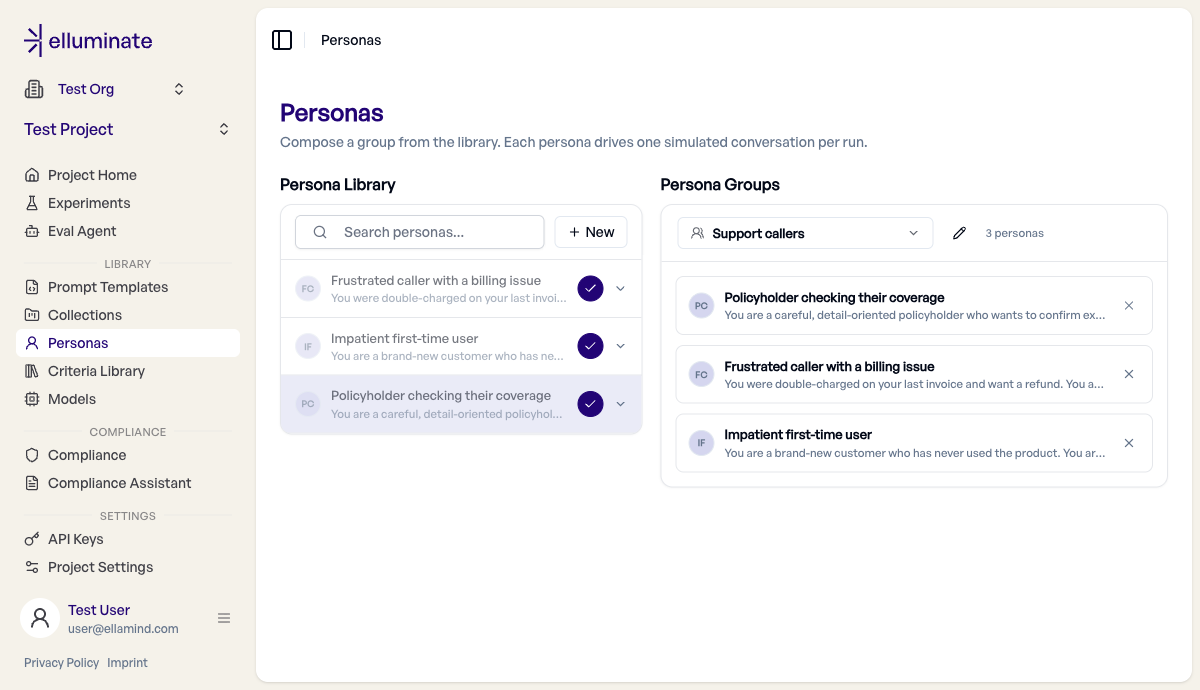
Creating and editing personas
- Click New at the top of the library to open the inline editor.
- Fill in:
- Name — a short label (e.g. Impatient first-time user).
- Persona description — the personality and behavior the simulator should adopt.
- Domain knowledge (optional) — knowledge or context the simulated user has, e.g. a collection of insurance policies.
- Click Save. Click any persona row later to edit it in place.
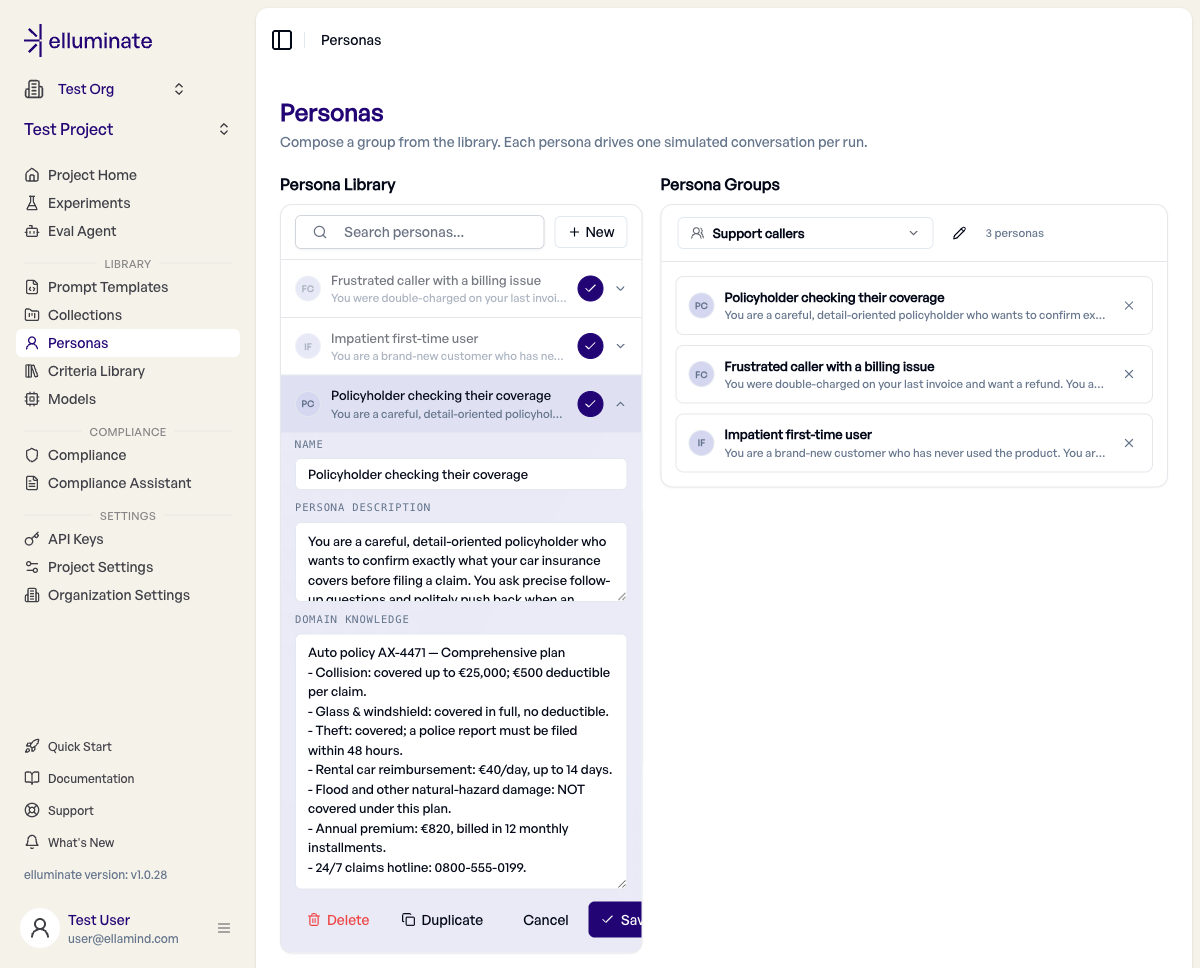
Sharing personas across projects
Personas live in a single project, but you can make a standard persona available everywhere in your organization instead of duplicating it per project.
- Flip the Share with organization toggle on a persona on the Personas page.
- Once shared, it becomes visible and usable read-only in every other project of the same organization — no need to recreate standard personas per project.
- Only the owning project can edit, un-share, or delete a shared persona. In other projects it shows a Shared badge and its fields are read-only.
- Sharing is lineage-wide: it applies to all versions of that persona, and can be turned off again from the owning project.
When a project needs to diverge from the shared original, clone/duplicate the persona into that project. This creates an independent, editable copy that starts un-shared, so you can adapt it without affecting the shared version.
Persona Groups
A persona group is a named pool of personas that an experiment runs together.
- In the right pane, use the group switcher to create a New group — give it a name and an optional description.
- Add personas to the group using the + / ✓ toggle on each library row. Members appear as cards in the group roster.
- Remove a member with the ✗ on its card.
Groups are mutable and not versioned. When an experiment is created, it captures an immutable snapshot of the exact persona versions in the group at that moment, so later edits to the group or its personas never change a finished experiment.
The Question Library
A persona experiment runs against a question library — a Persona-type collection where each row is one scenario.
- The collection must contain a Persona goal column. Its value is the goal the simulator pursues for that row.
- Any other columns can be referenced as
{{placeholders}}in a persona's description or domain knowledge. - A Persona collection cannot mix with Raw Input or Conversation columns — it is its own collection type.
The Bot's Prompt Template (optional)
The bot under test is configured via a system-only prompt template:
- Exactly one
systemmessage. - No
userorassistantmessages. - No user-side placeholders — the simulator drives the user turns.
When you set up a persona experiment, the template picker is filtered to only show system-only templates, because only the system message is passed to the bot's LLM endpoint.
Running a Persona Experiment
- Go to Experiments → New Experiment and pick the Persona type.
- In Choose a persona group, select the group to evaluate.
- Select the question library, the system-only prompt template, the LLM config for the bot under test, and the criterion set that will rate the transcripts.
- Review the conversation count and start the experiment.
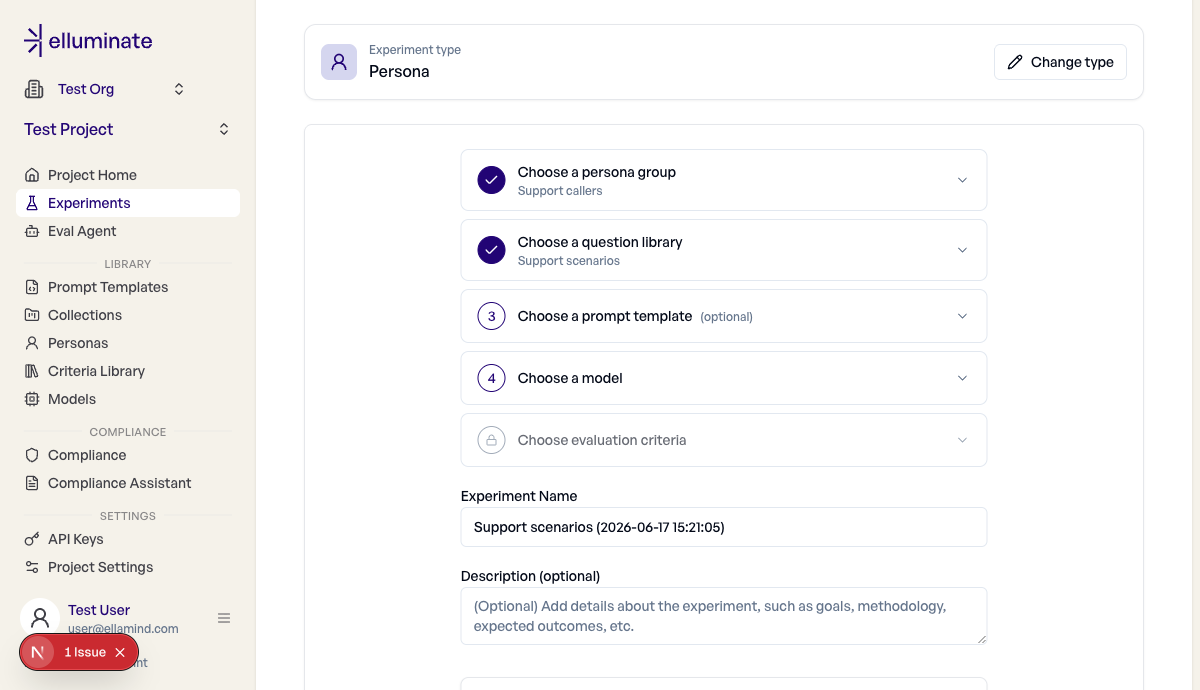
The experiment fans out across both dimensions: it runs one conversation per persona and per question-library row. With P personas and R rows, the experiment generates P × R conversations, which the form shows as a live count before you start.
How a Run Works
For each (persona, question-library row) pair:
- Render the persona's description and domain knowledge against the row's
{{column}}values, and read the goal from the Persona goal column. - The simulator generates the next user message. It sees the full conversation history with roles flipped (your bot's replies appear as
usermessages to the simulator, and vice versa). - The bot under test replies, using the optional system-only prompt template plus the experiment's LLM config.
- Steps 2 and 3 loop until the simulator calls
end_conversationorMAX_TURNSis reached. - The final transcript is stored as the response and rated by the criterion set.
Stateless vs. stateful providers
Most providers (OpenAI, Custom API, Mock) are stateless: the full conversation history is replayed on every bot turn. Botario keeps server-side session state keyed by sessionId, so only the current user turn is sent on each call. Botario also silently drops the bot's system prompt because state lives on the Botario side — the system prompt is still kept in the stored transcript, but it is not sent to the bot.
Reading the Results
- The full dialogue between simulator and bot is stored on each response and visible in the response viewer.
- Criterion ratings apply to the entire transcript, not to a single turn.
- The termination reason (
goal_met,goal_failed,stuck, orMAX_TURNS) is surfaced on the response. - Because each response is tied to the persona that produced it, you can filter results by persona to compare how different personas fared on the same scenarios.
SDK Reference
Personas and persona groups are managed in the UI. The SDK can reference an existing persona group when launching a multi-turn experiment by passing its persona_group_id, which is required for MULTI_TURN experiments:
from elluminate import Client

client = Client()

experiment, _ = client.experiments.get_or_create(
    name="Support quality — multi-turn",
    collection=question_library,      # a Persona-type collection
    prompt_template=system_only_template,
    persona_group_id=group_id,        # required for MULTI_TURN
)
Managing personas via the SDK
The SDK does not create or edit personas or persona groups — author them in the UI first, then reference the group's id. persona_group_id is available on experiments.create, experiments.get_or_create, and their async equivalents.
Related
- Conversations — static, pre-recorded conversation histories
- Agentic Evaluations — tool-using agent evaluations
- Criterion Sets — rule collections used to rate transcripts
- Experiments — running evaluations end-to-end